Atlas TR

Smile design, powered by AI

Atlas

AI-powered smile design for dentists and dental technicians. Send two photos; we prepare form recommendations, a guide-lined digital preview (mock-up) and an ExoCAD work package.

  • dental design
  • form recommendation
  • preview
  • ExoCAD
  • digital smile design
Measurement and guide lines (schematic) Schematic outline of six front teeth with midline, gingival margin, incisal edge curve, ridge lines and tooth-proportion measure. MIDLINE GINGIVAL MARGIN TOOTH PROPORTION INCISAL EDGE
Fig. 1 — measurement and guide linesschematic · not a patient image
§ 01

What It Does

A — analysis

Analysis from Photos

Looks at the smile and retracted shots and measures tooth proportions, midline, incisal display, and gingival margins. Submitted photos are processed and stored on the studio's own devices and never handed to third parties; only an identity-free mouth crop goes to the cloud image model.

B — form

Form Recommendation

Ranks a 441-form dental library by measurements, profile, and library geometry, and hands you 5 primary suggestions and 3 alternatives. Every card comes with its answer to "why this one?"

C — preview

Guide-lined Preview

The chosen form's outline and ridge lines are fitted onto the patient's photo, and the visual model stays inside that guide. A before/after slider goes to the dentist as a single file.

D — handover

ExoCAD Workflow

The accepted form and its constraints reach the technician's arrangement step as a ready work package.

§ 02

What Atlas Doesn't Do

Knowing the limit is part of the job.

01

It doesn't diagnose

It measures and suggests; diagnosis belongs to the dentist.

02

It doesn't decide

The decision is the dentist's. Atlas brings options; you make the choice.

03

It doesn't promise an outcome

The preview is a design illustration, not a commitment to a clinical result.

04

It doesn't send patient identity out

Submitted photos are processed and stored on the studio's own devices and never handed to third parties; only an identity-free mouth crop goes to the cloud image model.

05

It doesn't do the ExoCAD arrangement

The studio's designer does the arrangement; the dentist approves the form and the result. Atlas only prepares the work package.

§ 03

How It Works

Five steps from two photos to an ExoCAD work package.

  1. Photo

    The dentist takes two photos: one smile, one retracted. That's it.

  2. Measurement

    The local measurement chain kicks in; profile and tooth proportions go on record.

  3. Form recommendation

    The form engine produces the list; the dentist picks a form or says which line they want.

  4. Guide-lined preview

    The guide-lined preview is generated; the dentist slides it back and forth to take a look.

  5. ExoCAD

    The approved design becomes an ExoCAD work package.

§ 04

Why it can be trusted

01

Anatomical fidelity

Form selection rests on crown proportion (root excluded), facial proportions and library geometry; not eyeballing.

02

Clinical boundary

Diagnosis and approval stay with the dentist, set-up with the technician. Atlas proposes, never decides; the result is not a clinical guarantee.

03

Identity stays off the cloud

Photos are processed on the studio's own devices; only an identity-free mouth crop goes to the cloud.

§ 05

Form Engine

The form engine puts the library's geometry next to your measurements and lines up the forms that suit this patient best.

01

Recommendation Structure

Measurement and library data produce 5 primary suggestions and 3 alternatives. Only 1 form per family is shown, so you won't meet five cousins of the same form.

02

Profile Only

If tooth proportions can't be measured or no preference is given, the system runs on a profile-only marker and asks the dentist instead of guessing.

03

Root-Excluded Crown Ratio

Measurements are matched to gallery distributions as percentiles. The root-excluded crown ratio steers the form choice; that's where the fine-tuning comes from.

§ 06

Guide-lined Preview

The visual model is never told "draw whatever you like." It gets a clear frame built from aesthetic fidelity and constraints.

01

Linear Guidance

The selected form's green outline and orange ridge lines are laid over the patient's photo.

02

Fidelity

The visual model works bound to this guide; composite and thickness constraints are also taken into account.

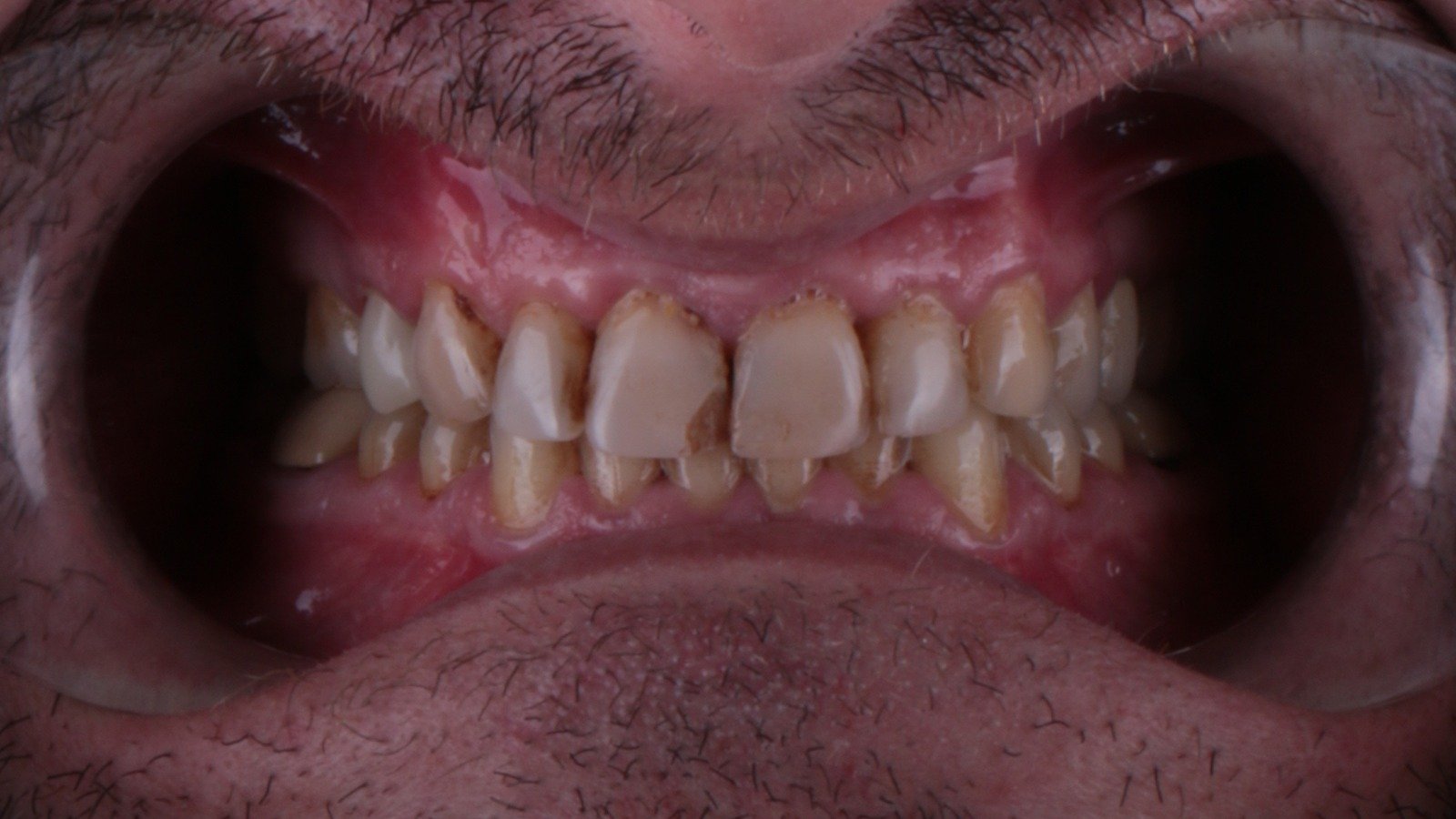
Retracted frame before the design: upper and lower teeth, lips held apartBEFORE
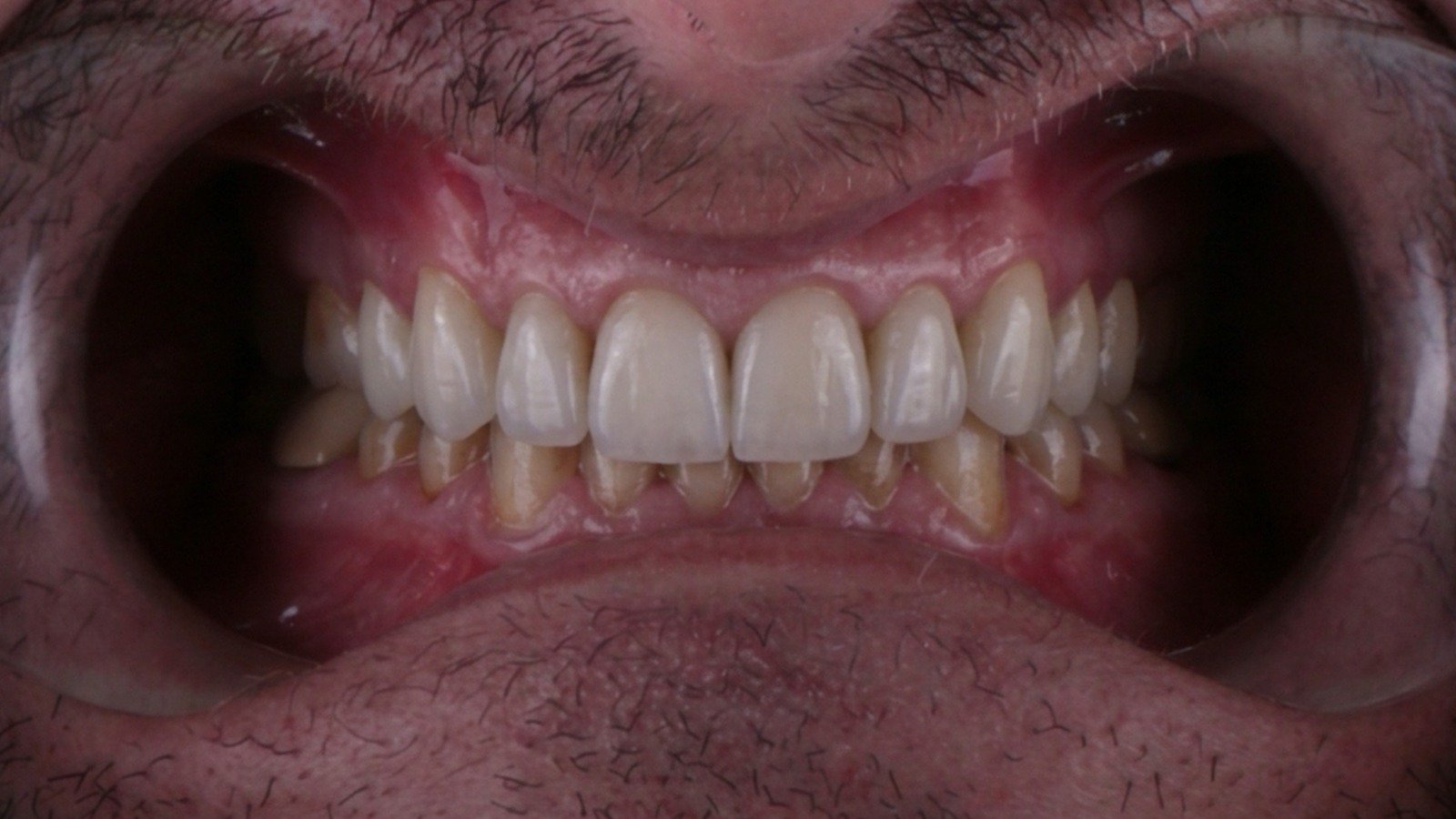
Retracted frame with the accepted design: same teeth, new formAFTER
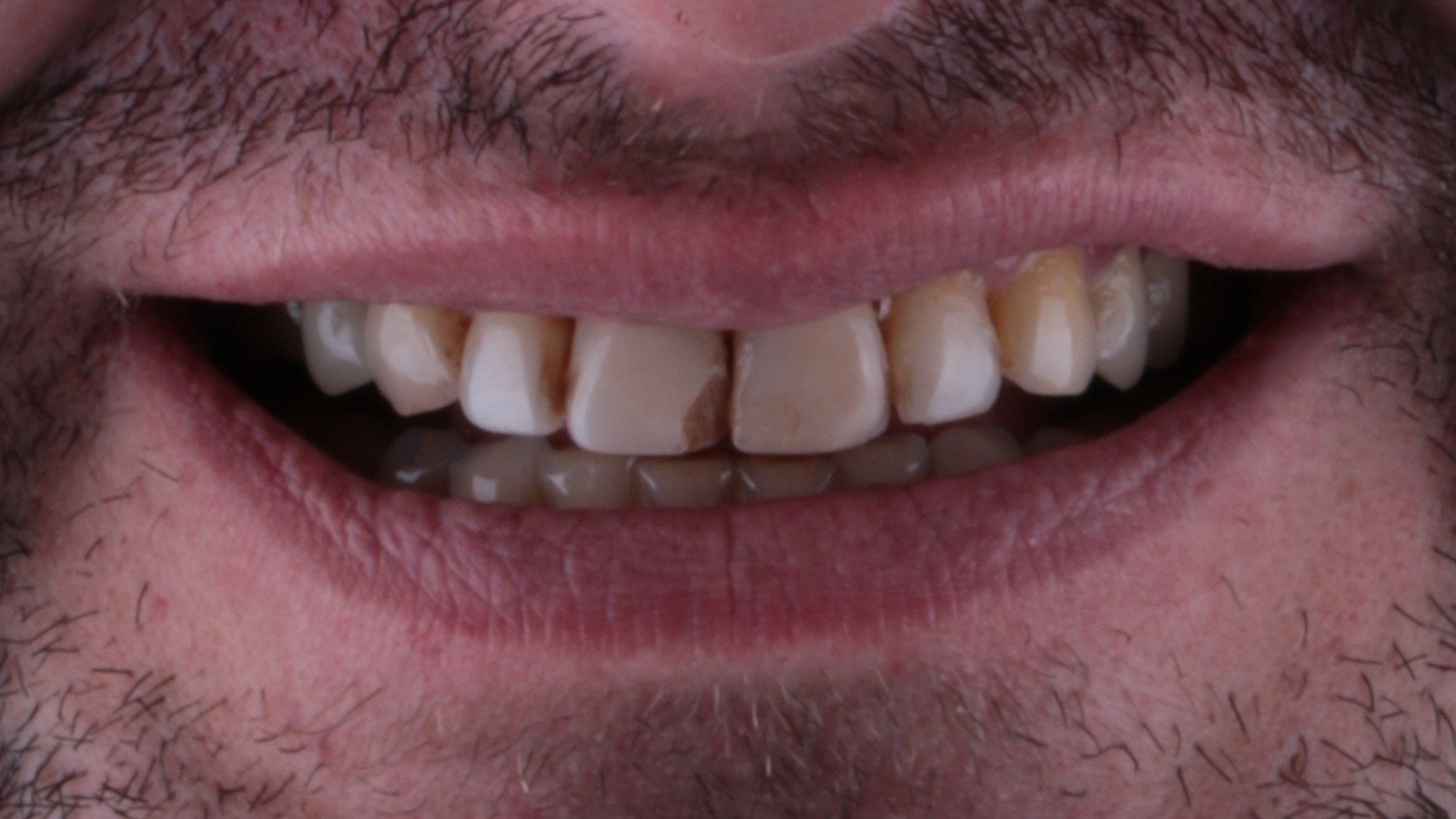
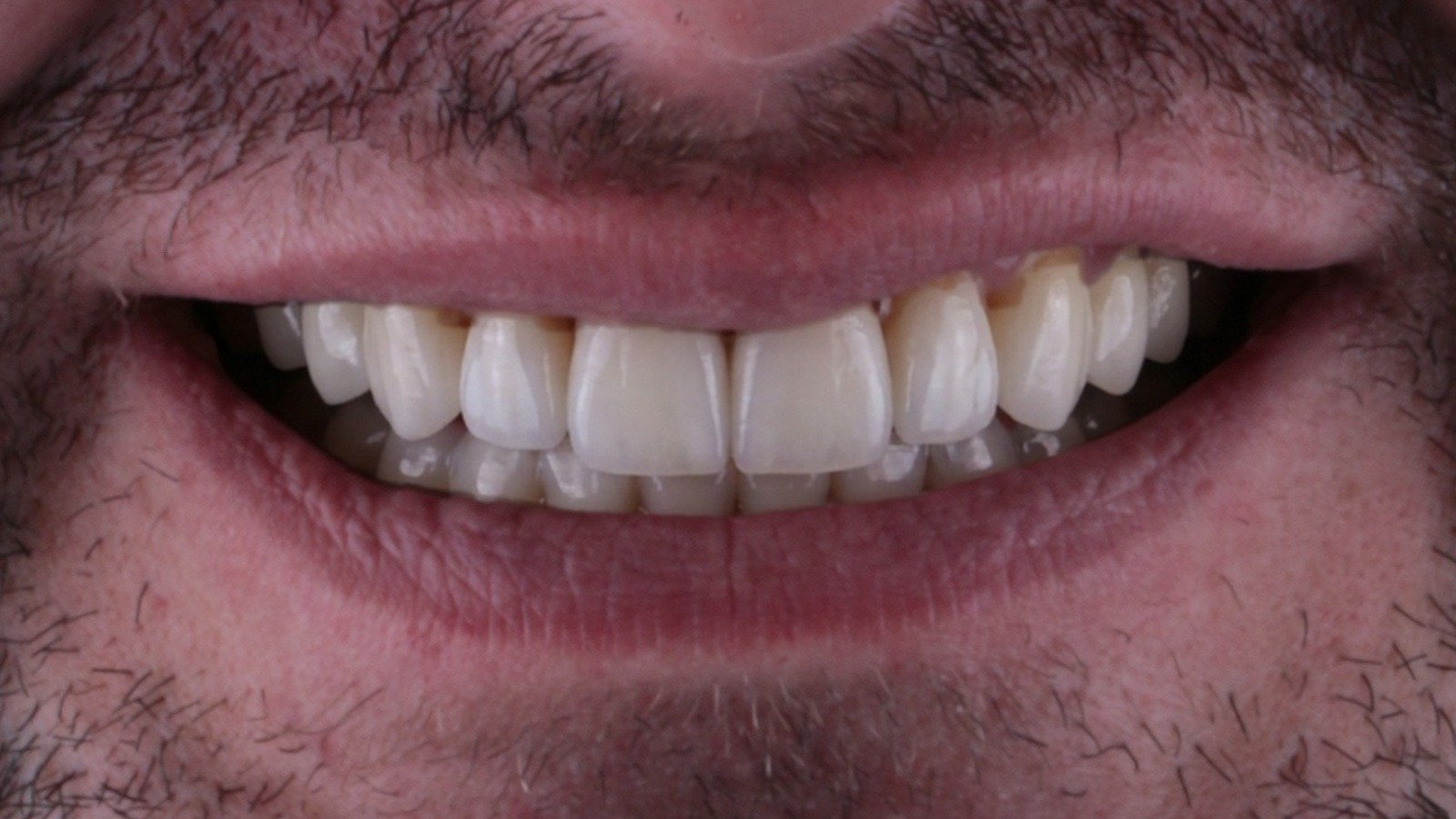
Clinical case, accepted design. Measurement comes from the retracted frame, the visual from the smile frame. No patient identity. This is a visual simulation, not a diagnosis.
  • Smile frame, before (faceless mouth crop)BEFORE
  • Smile frame after the accepted designAFTER
§ 07

Frequently Asked Questions

Q01

Where is patient data stored?

Submitted photos are processed and stored on the studio's own devices and never handed to third parties; only an identity-free mouth crop goes to the cloud image model. Page-view counting is cookieless and anonymous (Cloudflare Web Analytics). Details: Privacy and data note.

Q02

Which models does Atlas use?

Measurement and form ranking run on the studio's own devices; the preview image is produced with cloud image models. Which providers: Privacy and data note.

Q03

Is ExoCAD required?

No. Form recommendation and the preview work without ExoCAD; when it comes to the arrangement step, an ExoCAD work package is prepared.

Q04

What does the dentist do?

Takes the smile and retracted photos, picks one of Atlas's suggested forms or states a line preference, then looks over the guided preview.

Q05

What does the technician do?

Receives the work package with the dentist-approved form and constraints such as thickness limits, and carries out the arrangement step of the design.

Q06

Is this a product?

We don't sell software; we provide a service. You e-mail the case, we deliver a form proposal and a guide-lined preview. Timing and terms come with the reply to your case.

Q07

Can I apply directly as a patient?

No. Atlas works only with dentists, clinics and laboratories; patients reach us through their dentist. Atlas does not diagnose or recommend treatment.
§ 08

Send a Case

Two photos are enough; the rest is on us.

01 — you send

What to send

Two frames: a full-face smile frame and a retracted frame; daylight or flat light. An intraoral scan can be added if available. Please obtain patient consent before sending. A phone camera is enough.

02 — you get

What comes back

A form recommendation and a before/after slider with guide lines. Turnaround and terms come with the reply to your case.

More: Türkçe